Communications

The right message, at the right stage of the journey.

Your PMS continues to manage routine appointment reminders, while Posture 4 Health supports the wider client journey through reports, surveys, portal notifications, education, re-engagement and practice-approved emails and texts.

Together, they create a more complete communication experience without adding unnecessary noise for the client or extra work for your team.

Who sends what

  • Your PMS: routine appointment reminders
  • Posture 4 Health: reports, surveys, portal notifications, education and re-engagement
  • You: approve every message before it is switched on
How Sending Is Divided

Who sends what

Left with your PMS

Reminders for routine adjustment visits. Posture 4 Health does not remind on these, so clients are not messaged twice.

Sent by Posture 4 Health

Journey messages, portal notifications, surveys, report-ready notices and exam reminders where you switch them on.

Under your control

Every journey message is a draft until you activate it, with the channel, timing and wording visible for each one.

Communication Pathways

A message for each stage of the journey

PathwayPurpose
Before the initial visitPractice-approved expectations, preparation, surveys and relevant instructions.
Before the report conversationA clear introduction to what the appointment will cover and why the report is being reviewed.
After the first adjustmentAnswers to common questions in the language of the practice.
During the journeySupporting emails, texts, portal content, articles and quizzes matched to the stage of care.
Before a re-examQuestionnaire requests and preparation for the progress review.
Re-engagementDrafted follow-up for clients who meet the practice's configured re-engagement criteria.
Reviews and sharingAutomated or manual review requests and portal sharing tools at practice-defined moments.
Your Language

One practice voice, from tableside to front desk to phone.

Posture 4 Health can use the practice's own terminology, tone and visual identity, helping the client hear the same message from the practitioner, the front desk and the communication that follows.

  • A practice style that sets the default wording
  • Any single term can be typed over
  • Your logo and colours on reports, emails and the portal
  • Opt-out handling on texts, and an unsubscribe on emails
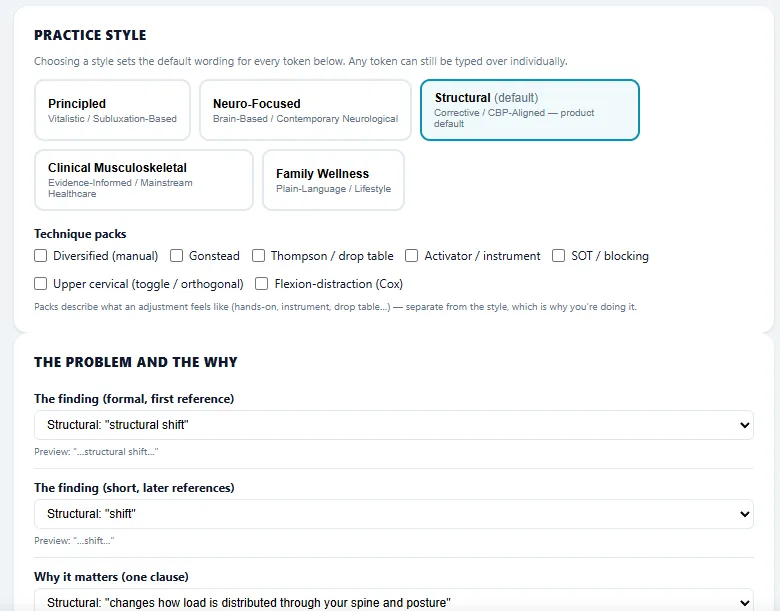
The Practice Terminology settings
Practice terminology settings Illustration using demo data.

Hear your own practice in every message.

See the journey messages, edit one together, and decide what you would switch on first.

Book a Demonstration