Practice Intelligence

The practice statistics every owner asks for, in one place.

New clients, conversion, retention, collections and profit, each measured against a target you set, with a named owner for every response. From the morning huddle to the annual board pack.

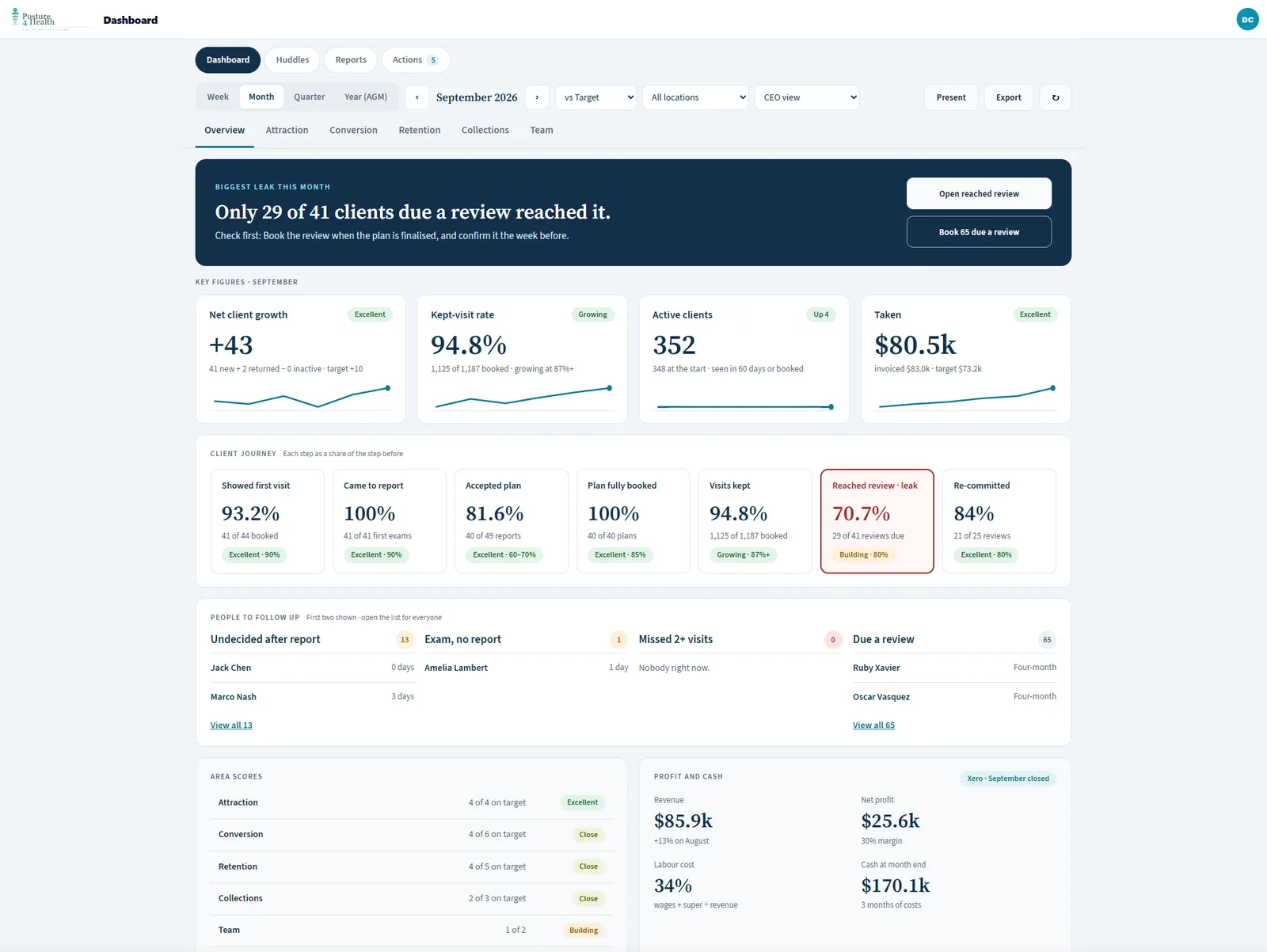
The owner dashboard for one month: the biggest leak, key figures against target, the client journey as a chain, people to follow up, area scores and profit and cash from Xero
The owner overview for one month Illustration using demo data.
Start Here

Open it and it tells you where the practice is leaking.

The overview answers the questions an owner asks first, then lets you go as deep as the question needs.

The biggest leak this month

One sentence naming the step where most people were lost, with the first thing to check.

Key figures against target

Net client growth, kept-visit rate, active clients and money taken, each with its target beside it.

The client journey as a chain

First visit, report, plan accepted, plan fully booked, visits kept, reached review and re-committed, each as a share of the step before.

People to follow up

Undecided after their report, exam but no report, missed two or more visits, and due a review. Named, with how long they have waited.

Area scores

Attraction, conversion, retention, collections and team, each scored against the targets you have set.

Profit and cash from Xero

Revenue, net profit, labour cost and cash at month end, beside the practice numbers rather than in a separate report.

The Views

Look at the practice the way you run it.

Choose a view to see what it shows.

Do new people commit to care?

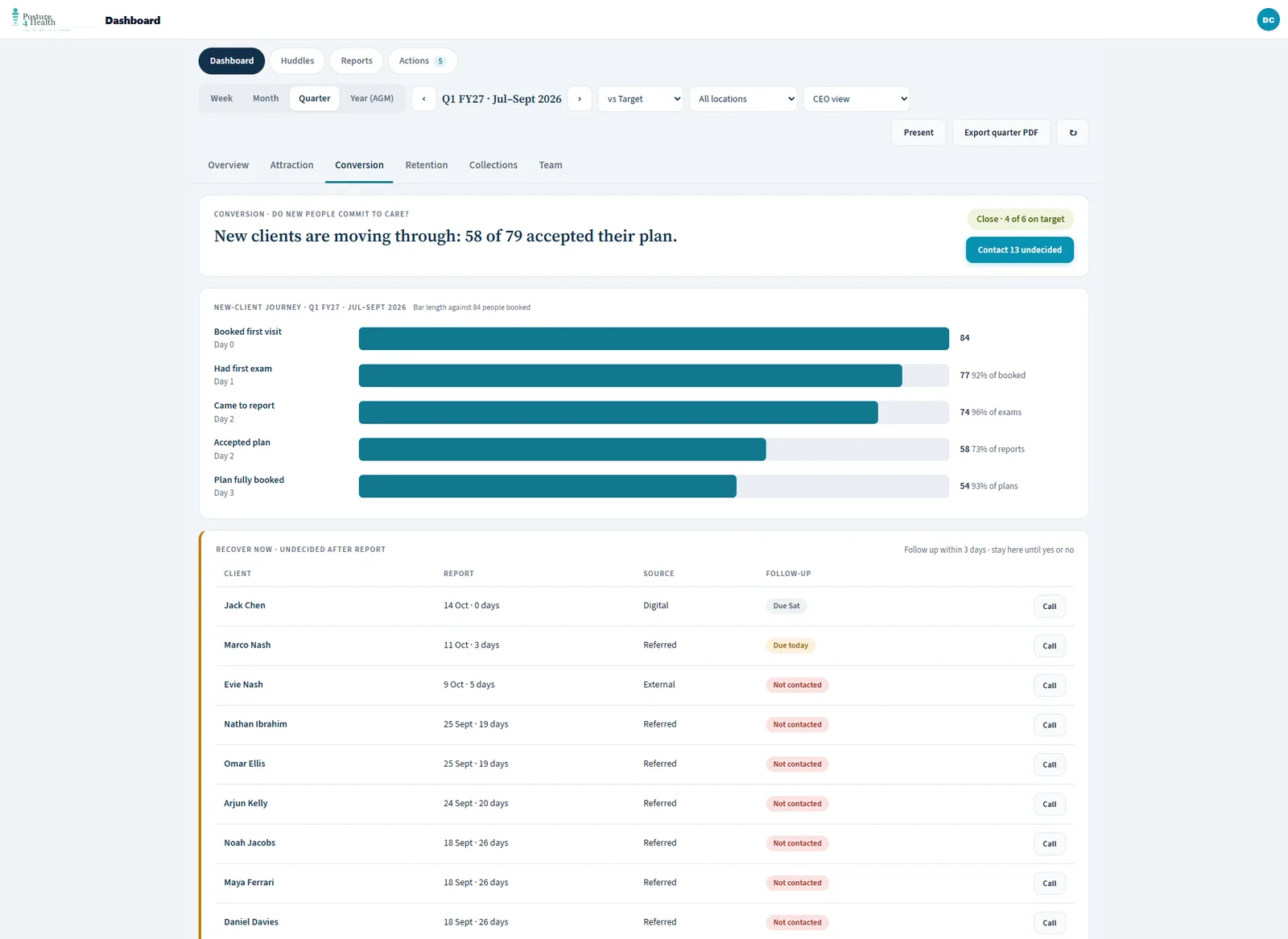
Follow every new client from first booking to a fully booked plan, and see who is still undecided after their report.

  • Booked first visit, first exam, came to report, accepted plan, plan fully booked
  • Each step shown against everyone who booked, so the drop is obvious
  • An undecided list with the source and a call button, so every follow-up has a name against it
The conversion view: the new-client journey as bars and the undecided-after-report list
The new-client journey and the undecided list Illustration using demo data.

Do clients keep their visits and keep going?

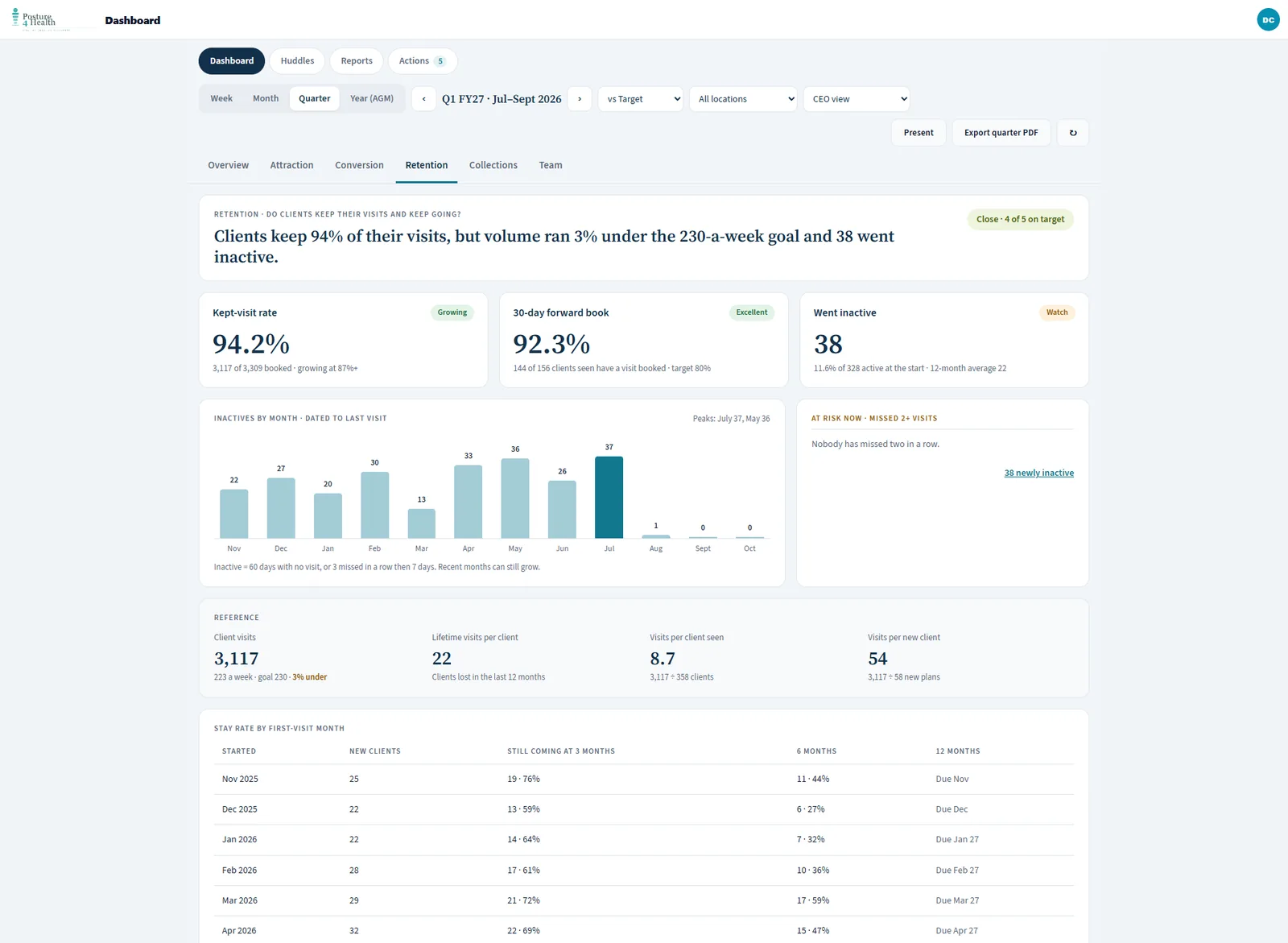
See who is staying, who is slipping and how long newer clients last, before it shows up as a quiet diary.

  • Kept-visit rate, with the count behind it
  • Thirty-day forward book: of the clients seen, how many have a visit booked
  • Who went inactive, month by month, and who has missed two visits in a row
  • Stay rate by first-visit month, at three, six and twelve months
The retention view: kept-visit rate, forward book, inactives by month and stay rate by first-visit month
Retention, inactives and stay rate Illustration using demo data.

Are we collecting, profitable and holding cash?

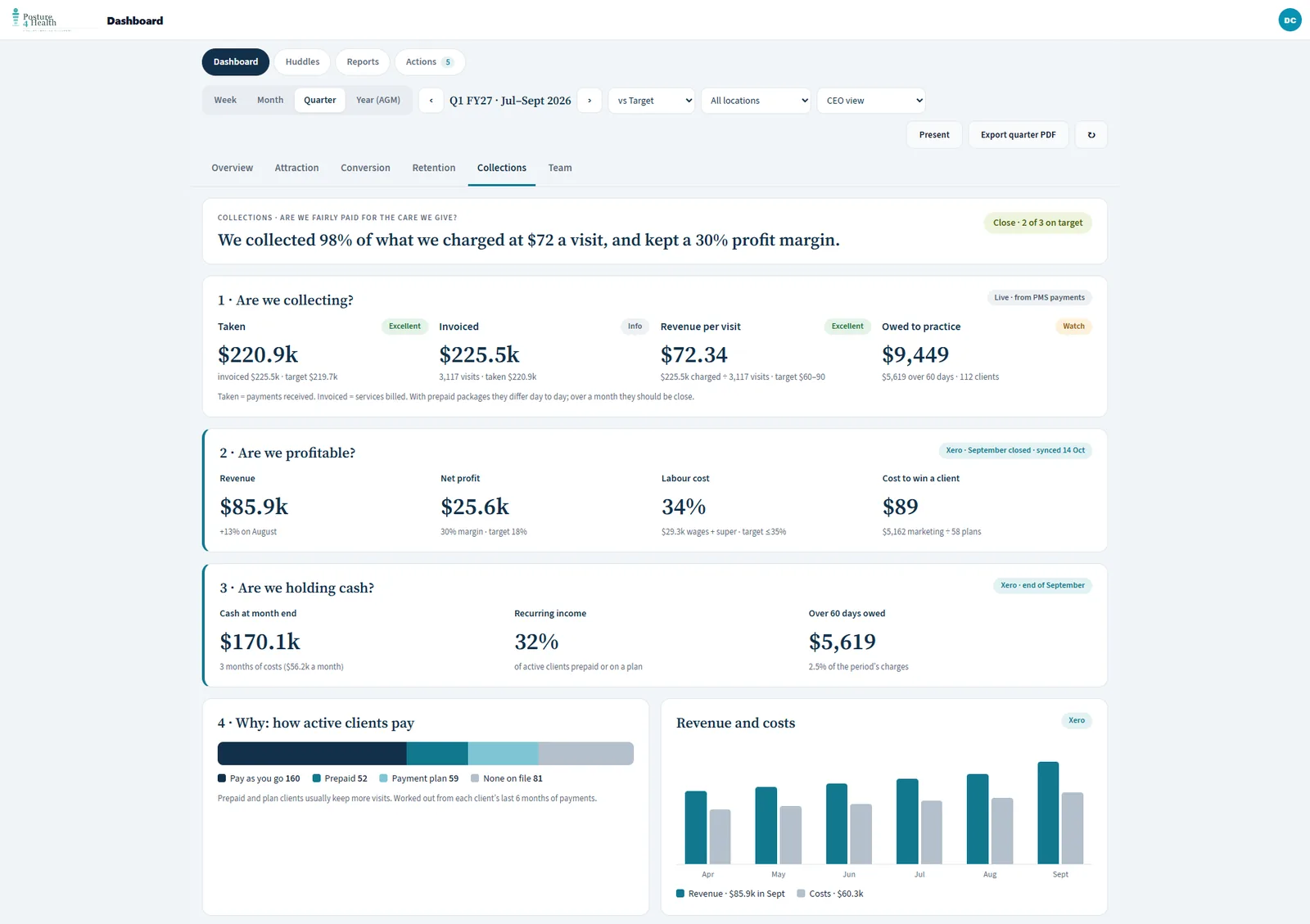
The money side, in the order an owner thinks about it. Payment figures come from your PMS where it provides them, and profit and cash come from Xero.

  • Taken, invoiced, revenue per visit and what clients owe
  • Revenue, net profit, labour cost and the cost to win a client
  • Cash at month end in months of costs, recurring income and amounts more than 60 days overdue
  • How active clients pay: pay as you go, prepaid or on a payment plan
The collections view: taken against invoiced, profit, cash and how active clients pay
Collections, profit and cash Illustration using demo data.

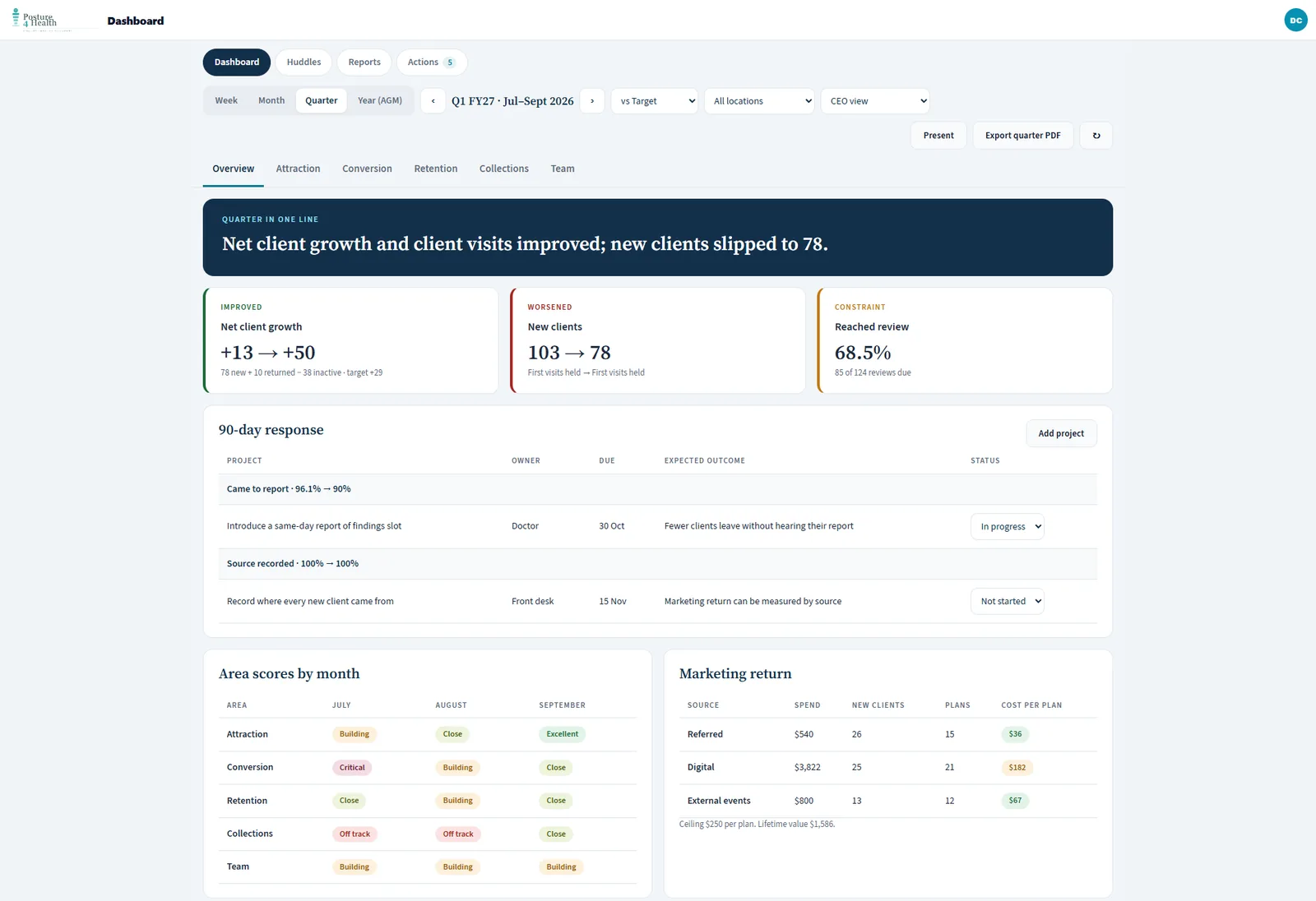
The quarter in one line.

A review built for the owner meeting: what improved, what got worse, the constraint, and the response you committed to.

  • Improved, worsened and the constraint, side by side
  • A 90-day response: each project with an owner, a due date and the outcome you expect
  • Area scores month by month, and marketing return by source
  • Export the quarter as a PDF
The quarter review: the quarter in one line, improved, worsened and constraint, the 90-day response and marketing return
The quarter review Illustration using demo data.

From the daily numbers to the annual meeting.

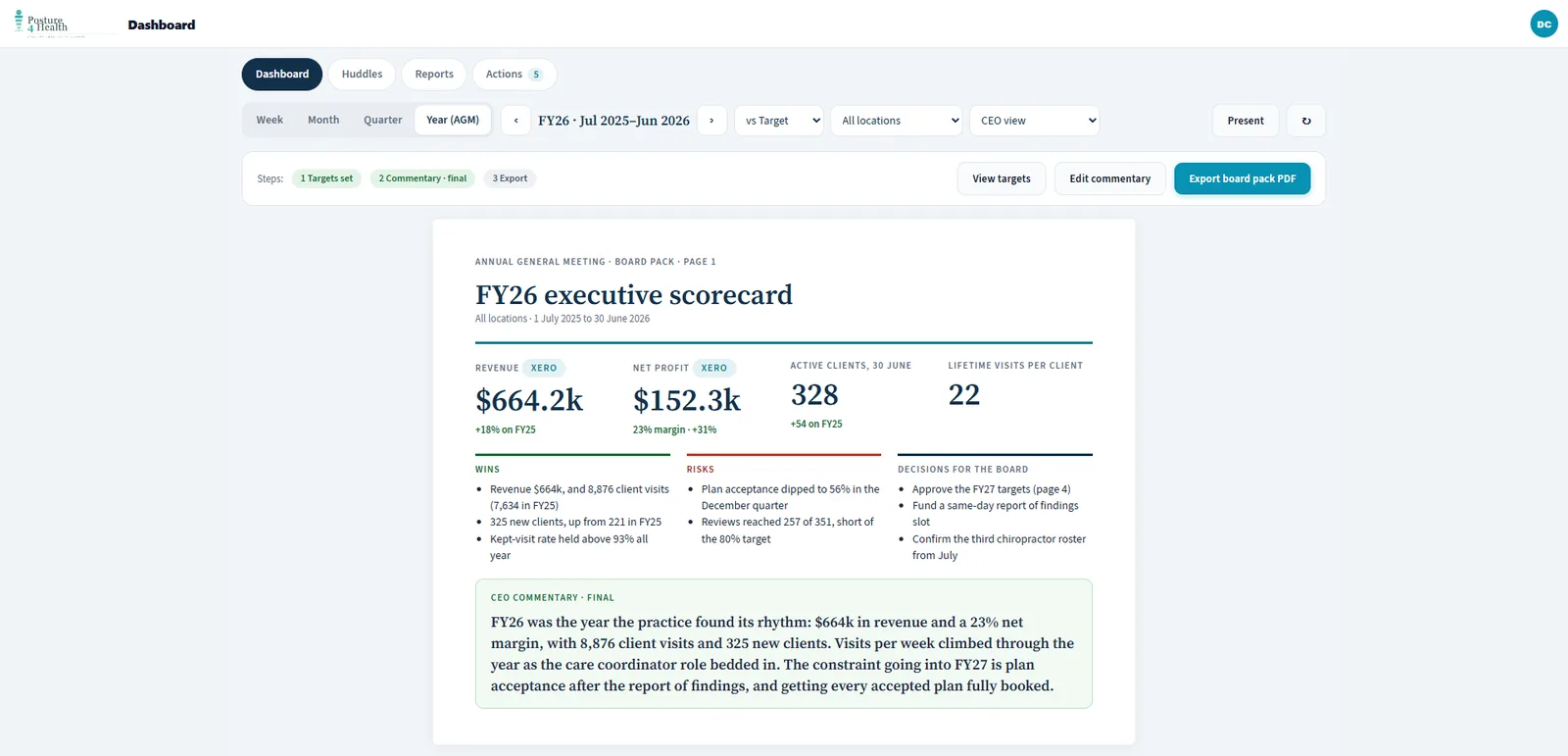
The year assembles itself from the months beneath it, so the board pack is a review rather than a rebuild.

  • An executive scorecard: revenue and net profit from Xero, active clients and lifetime visits per client
  • Wins, risks and decisions for the board, with final commentary
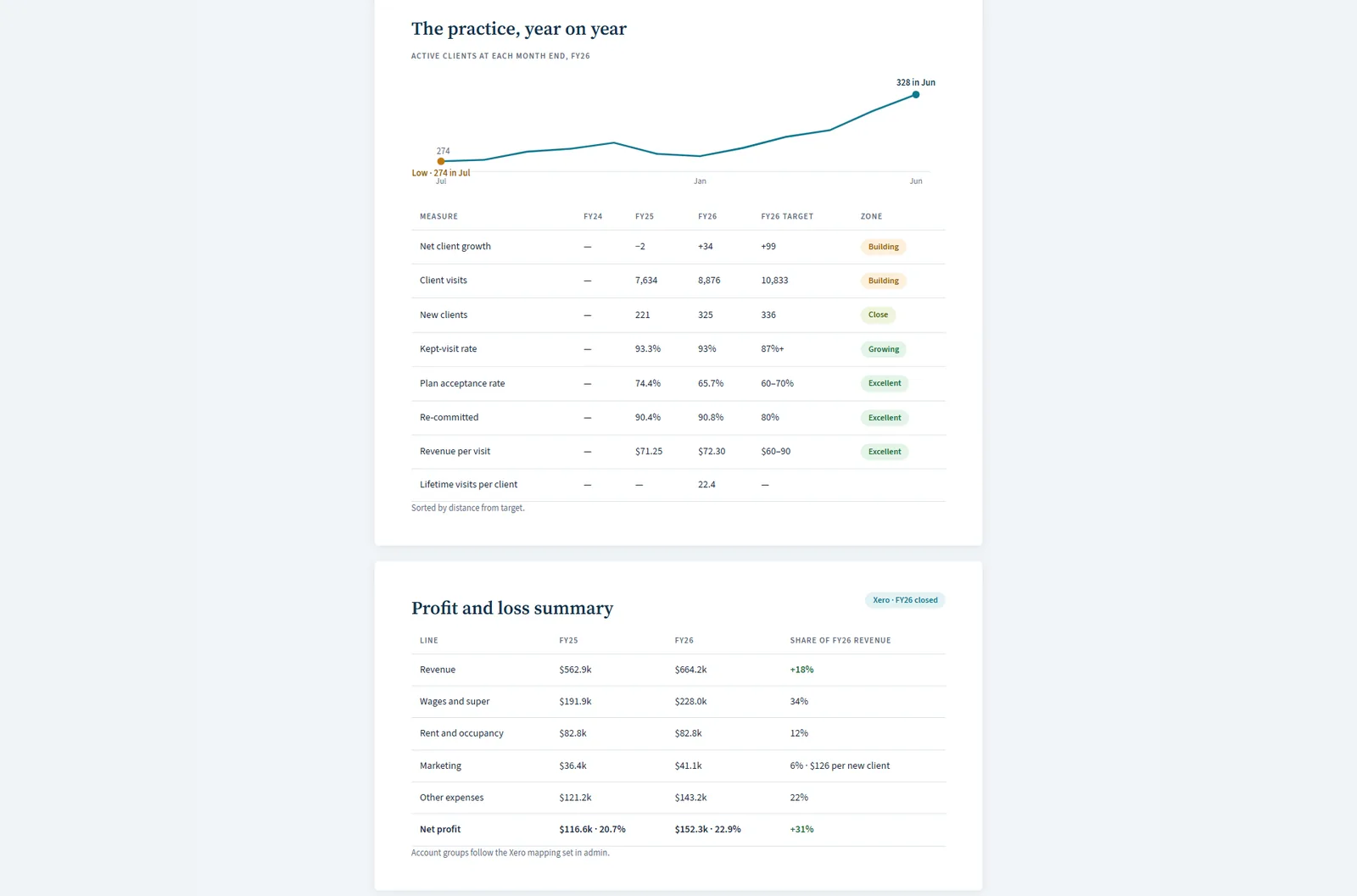
  • Year on year against target, and the next year's targets locked before export
  • Board-pack export unlocks once targets are locked and commentary is final
The year view: the executive scorecard with revenue, net profit, wins, risks, decisions and commentary
The annual executive scorecard Illustration using demo data.
Year on year: active clients through the year, measures against target and a profit and loss summary
Year on year, with a profit and loss summary Illustration using demo data.
Every Shift

Start the shift knowing the plan.

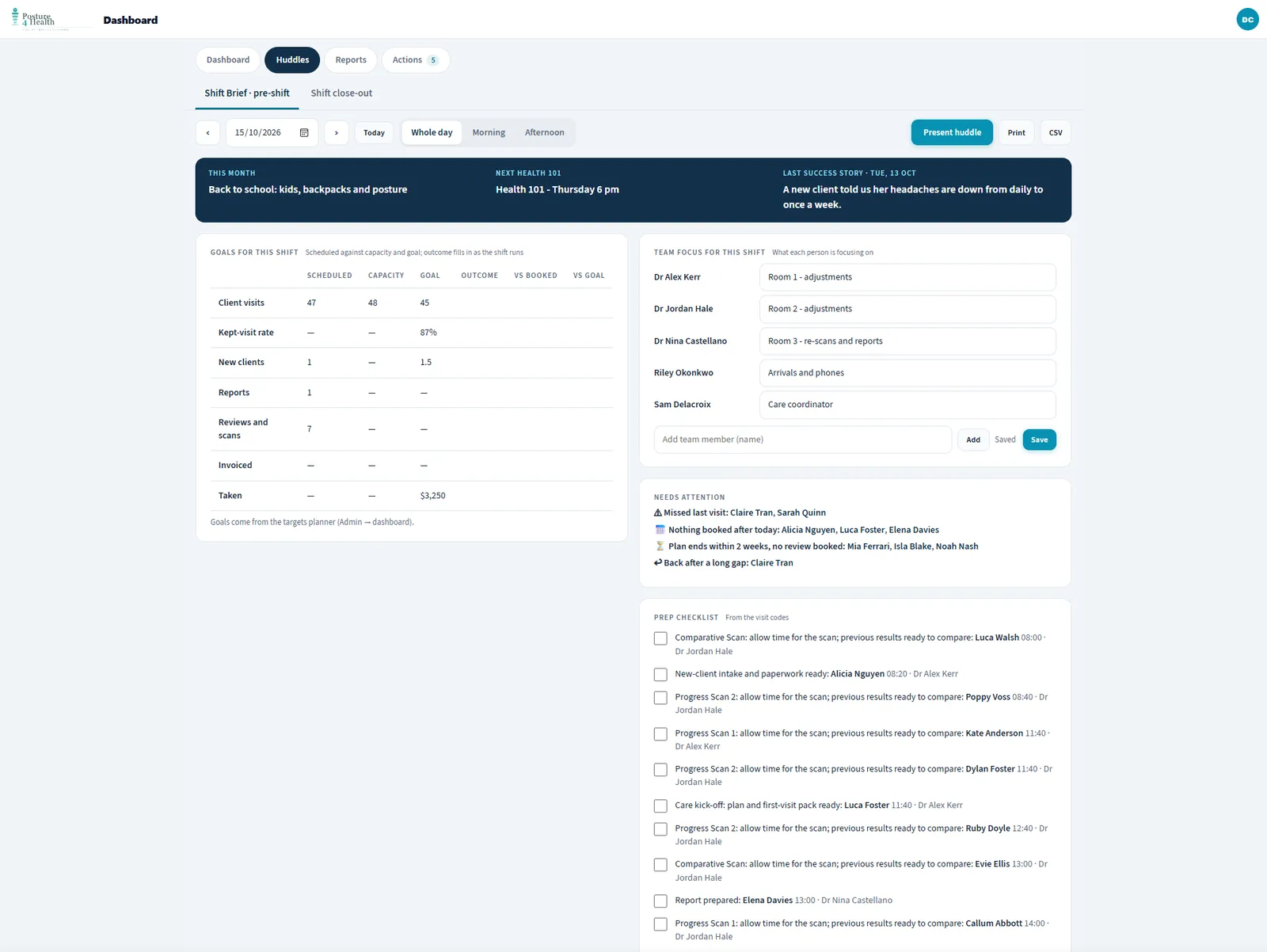
The pre-shift brief sets the day's goals against capacity, shows what each person is focusing on, and flags the clients who need attention before they arrive.

  • Goals for the shift: visits, kept-visit rate, new clients, reports, reviews and scans
  • Who needs attention: missed their last visit, nothing booked after today, plan ending within two weeks with no review booked
  • A prep checklist built from the visit types on the day
  • Present it on a screen, print it or export it as a CSV
The pre-shift brief: goals for the shift, team focus, who needs attention and a prep checklist
The pre-shift brief Illustration using demo data.
Close The Loop

Finish the shift with the numbers.

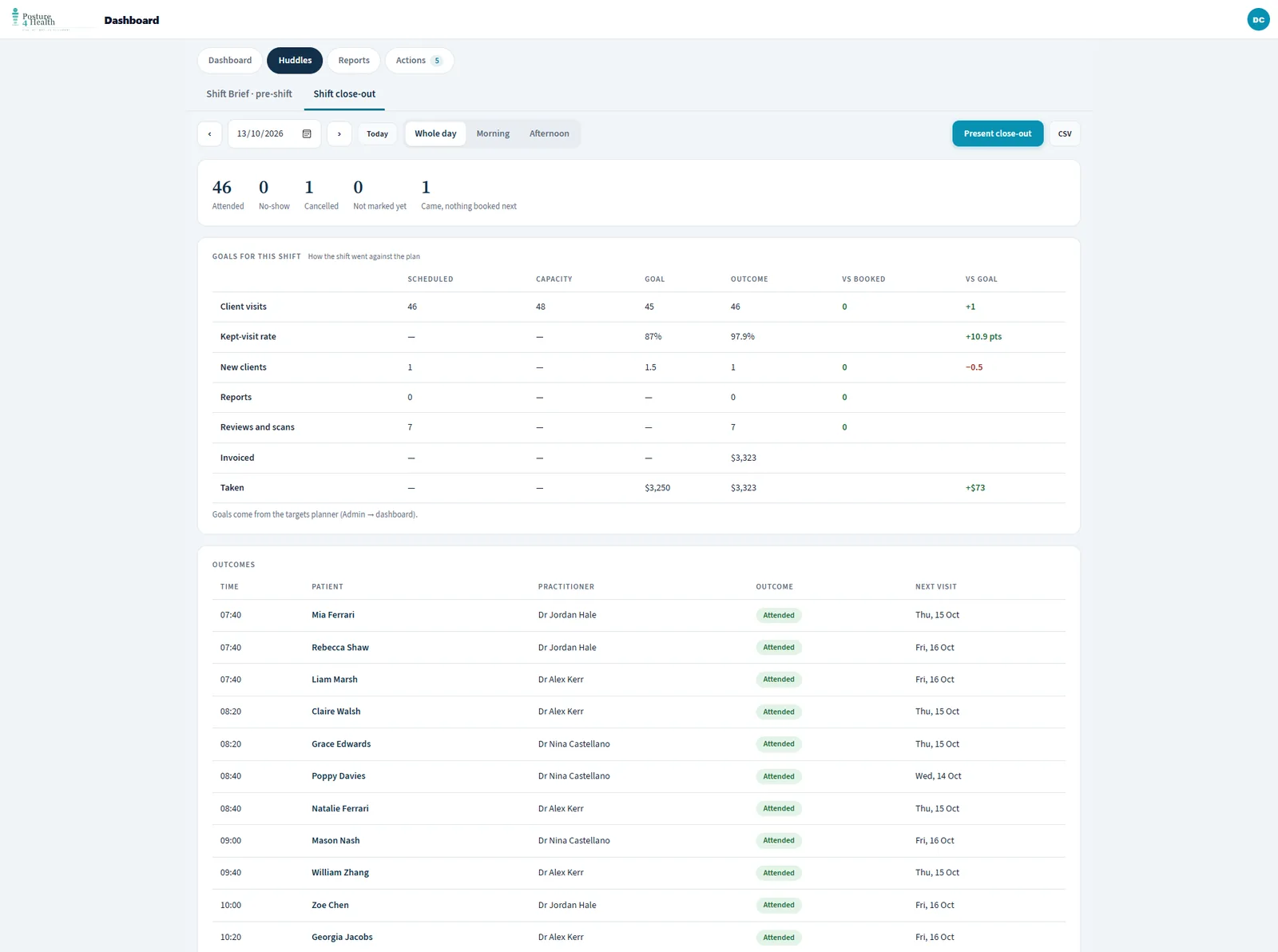
The close-out shows how the shift went against the plan, and who still needs a next visit.

  • Attended, no-show, cancelled, not marked yet, and came with nothing booked next
  • Each goal against its outcome, including kept-visit rate and money taken
  • An outcomes list with every client's next visit
The shift close-out: attended, no-show and cancelled counts, goals against outcomes and a list of outcomes
The shift close-out Illustration using demo data.
Every Week

Run the Monday meeting in steps.

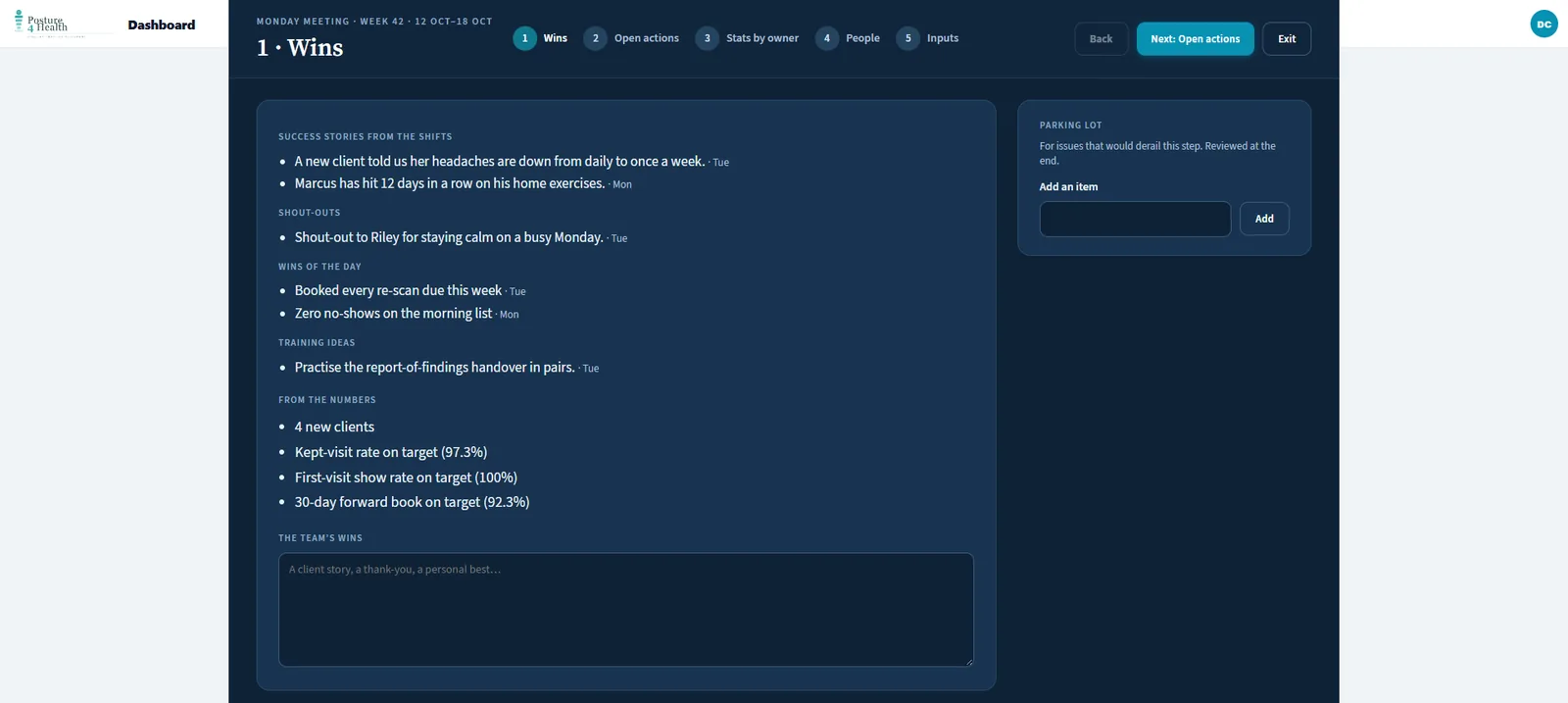
The weekly meeting walks the team through the week in order, so the meeting runs to the numbers rather than to whoever speaks first.

  • Wins and success stories from the shifts, with the numbers that were on target
  • Open actions, then the stats by owner, then the people to call, then the inputs
  • A parking lot for issues that would derail the step
The weekly meeting, step one: wins and success stories, shout-outs and numbers on target
The weekly meeting, step one Illustration using demo data.
Actions

Every number leads to an action with an owner.

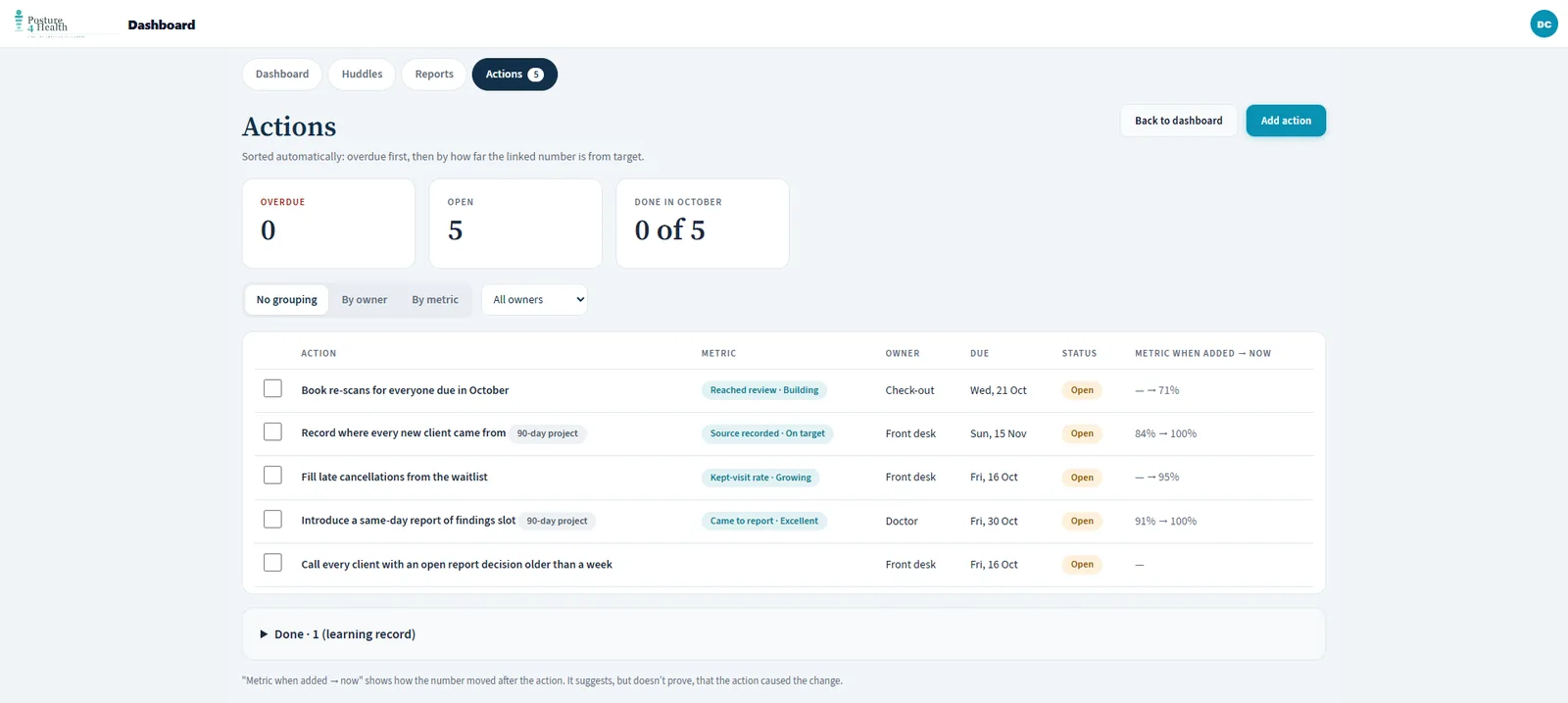
An action is linked to the metric it is meant to move, has an owner and a due date, and shows how that number has changed since the action was added.

  • Sorted automatically: overdue first, then by how far the linked number is from target
  • Day-to-day actions and 90-day projects in one list
  • Group by owner or by metric, or filter to one person
  • The change since the action was added suggests, but does not prove, that the action caused it
The actions list: each action with its linked metric, owner, due date and the metric when added against now
The actions list Illustration using demo data.
New Clients

See where every new client came from, and what happened next.

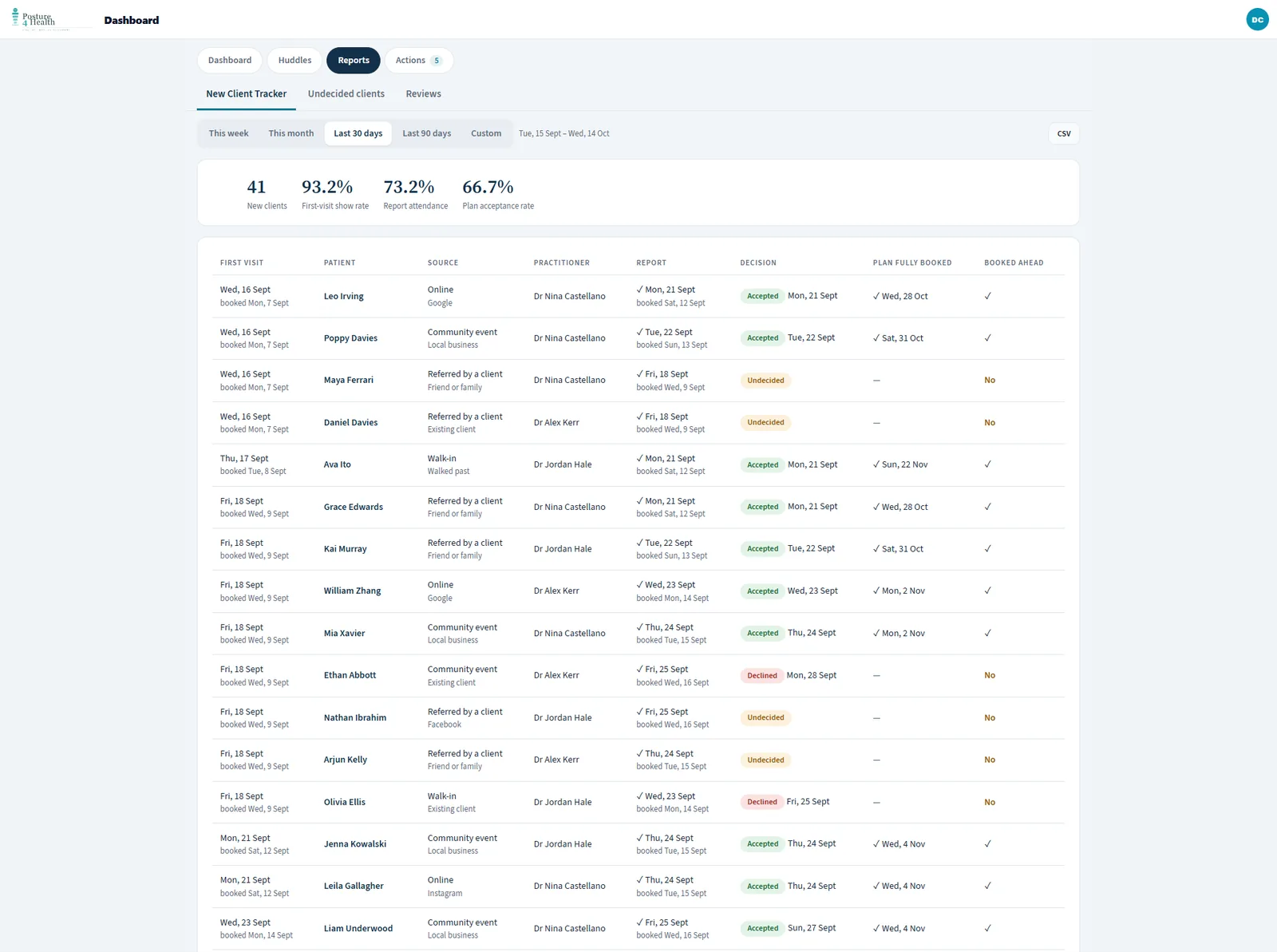
The new-client tracker follows each first visit through the report and the decision, so the marketing return and the front-desk follow-up are visible in one list.

  • Source, practitioner, report date, decision and whether the plan is fully booked
  • First-visit show rate, report attendance and plan acceptance for the period
  • This week, this month, 30 or 90 days, or a custom range, with a CSV export
The new-client tracker: first visit, source, practitioner, report, decision and plan booked ahead
The new-client tracker Illustration using demo data.
Inside The Client Journey

The deeper statistics behind the dashboard.

Every client moves through stages, and every stage change is recorded. These are the statistics that fall out of that record.

StatisticWhat it tells you
ScoreboardNew clients, new active plans, graduated, reactivated, ceased and lapsed now, for the week, month or quarter, each with a target and a stretch goal and the change on the prior period where it can be worked out.
Quarterly scorecardThe current quarter month by month, with totals and averages, ready to print or export as a CSV.
Conversion funnelHow many clients have ever reached each stage, from first contact through an active plan and what follows it.
Kept-visit rateAttended divided by attended, no-shows and cancellations, with a count of past visits still marked booked so nothing hides.
Forward bookFuture scheduled visits, the leading indicator of next month's diary.
Visit volumeVisits per week with a trailing average, and the best period on record.
Visits per completed caseLifetime visits for clients who finished a plan, with the median as the headline and the mean alongside.
Continuation after graduationOf clients who finish a plan, how many continue into maintenance or wellness, and how many stick.
Re-commitment by review pointAt each review point you define, how many started another plan and kept attending.
Cancellations and no-showsThe reasons given, the split by practitioner, and whether reminded clients miss fewer visits than unreminded ones.
Referral sources and data qualityWhere clients heard about you, plus missing contact details and likely duplicate records that distort the counts.
Where The Numbers Come From

Stated plainly, so you know what to trust.

  • Appointments and attendance come from your PMS on its sync cycle. PracSuite refreshes about every five minutes by day and Cliniko about every two hours.
  • Payments taken, invoiced and owed come from the PMS payment data we can read, which today means PracSuite. For other systems the money side comes from Xero.
  • Profit, labour cost and cash come from Xero through a daily, read-only sync. Posture 4 Health does not write to Xero.
  • Targets are yours. Zones such as Excellent, Close, Building and Critical are drawn from the targets the practice sets, and the product ships with defaults you can change.
  • The statistics describe activity and money, not clinical outcomes. They show what the practice did and what followed, and they are not a diagnosis of anyone's health.

See the week, the quarter and the year assembled for you.

A walkthrough of the owner dashboard using your locations, practitioners and the targets you work to.

Book a Demonstration